Spectral weightings#
Selecting weightings#
The calculated levels can be frequency weighted by spectral curves to reflect sensitivities of target animals. This weighting is applied to Leq/RMS and third-octave bands. Lpeak is not weighted and is only displayed when selecting the Linear/Unweighted option.
Click on the ‘Weightings’ button  to reveal the weightings pop-up menu.
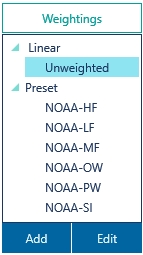
The spectral weightings are divided into categories. Linear and Preset categories are predefined, other categories can be created by the user when adding or editing weightings.
The Linear/Unweighted weighting is the default option and applies no weighting to the displayed results.
Custom/User-defined weightings#
The buttons Add and Edit can be used to create a new user-defined weighting or edit an existing weighting. User defined weightings are saved in .dbww files in a folder which can be set in Menu burger/ Options.
The Edit button will launch the ‘Edit Existing User Defined Weighting’ window. From there the user can change the name, category and displayed units (e.g. ‘dB’, ‘dBA’). The user can also add a description, which will also appear in hint pop-ups when the user hovers over the ‘Weightings’ list.
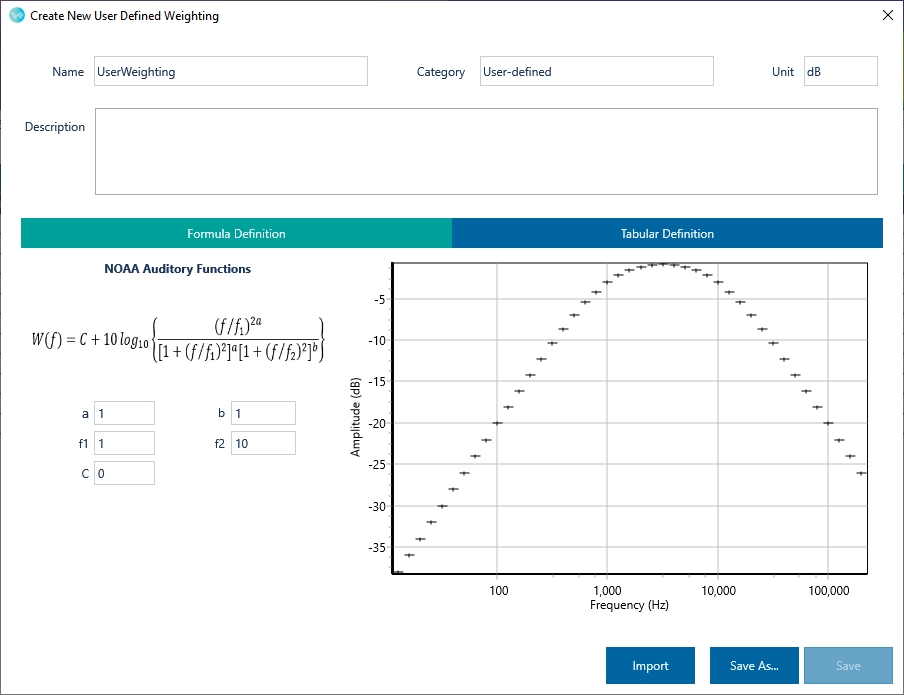
For underwater spectral weightings, the user has the option to define parameters in the NOAA auditory function under the ‘Formula Definition’ tab. This will allow update of the NOAA definitions as more research comes to the fore. The tabular definition tab allows the user to enter in a table of third octave band frequencies and level gains. The altered weighting definition can then be saved under a new file name.
User defined spectral weightings (.dbww files) can be copied from the weightings folder and distributed to other dBWav users. Clicking the ‘Import’ button allows the user to import .dbww weighting definition files from other users of dBWav.