Licence Issues#
How do I swap my licence to another computer?#
To swap a dBWav licence to another computer you do not need to uninstall dBWav, you just need to deactivate the licence on the first computer.
To deactivate the licence on the first computer, go to the Menu Button (three horizontal bars icon, top right), and select the ‘Licence’ option. This will open the Licence Manger. Click the ‘Deactivate’ button.
You can then activate your dBWav licence on another computer with your licence key by going to the Licence Manager on the second computer and entering in the licence key.
Note
There is no limit to the number of times you can do this. You just cannot use one licence of dBWav at the same time on two different computers.
I have one licence of dBWav. Can I only install dBWav on one computer?#
If you have one licence you can install dBWav on several computers, but you can only activate the licence on one computer at a time. To swap a dBWav licence to another computer you do not need to uninstall dBWav, you just need to deactivate the licence on the first computer:
- Use the ‘Deactivate’ button in the ‘Manage License’ dialogue on the first computer
- You can then activate the licence on another computer with your licence key
Note
There is no limit to the number of times you can do this. You just cannot use one licence of dBWav at the same time on two different computers.
I am having trouble activating or deactivating my licence#
If you submit your licence and an 'Unable to verify code error' is returned followed by some html code, then there may be a problem with accessing the licence server.
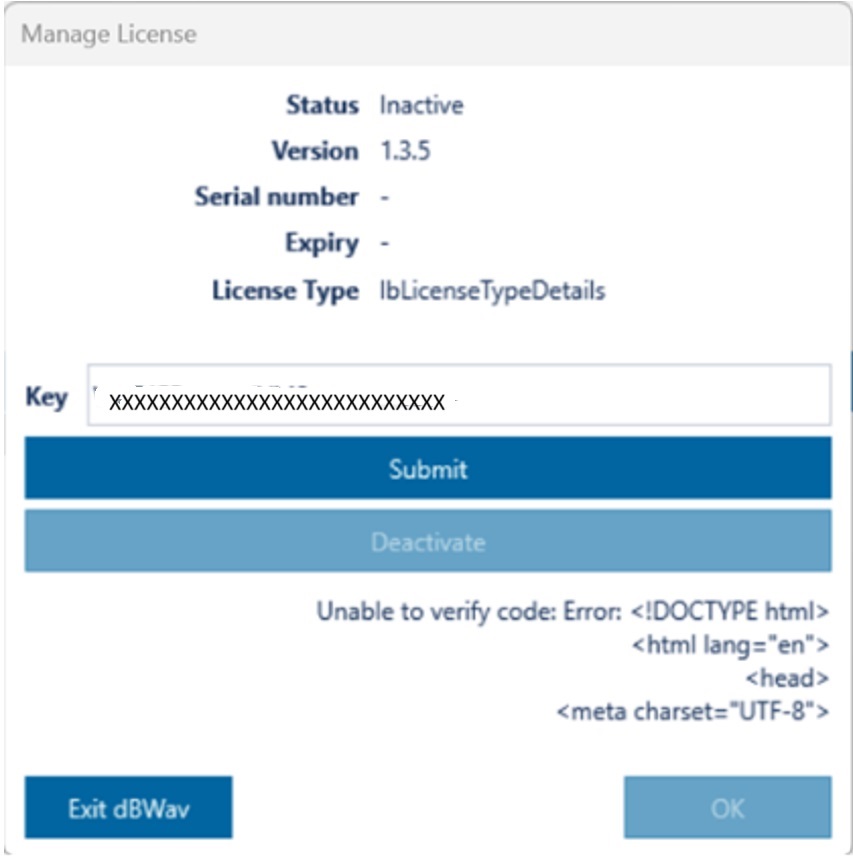
You can further diagnose the problem by accessing the licence server directly: Go to this address https://license.marshallday.co.nz/licenses.json in a web browser.
If you get error 404, then you can't reach the server and it might be the case that your firewall is blocking access. You will have to contact your IT department to whitelist our server (license.marshallday.co.nz).
Other errors, particularly 403, indicate a server access problem. In which case it would be best for you to contact us.